WhatsApp templates
Create WhatsApp templates in Slovio: name, category, header, body variables, footer, buttons and carousel cards, with the limits and what each status means.
5 min readUpdated
A WhatsApp template is a message Meta approves in advance. You need one to start a conversation, to send a broadcast, or to reply after the 24-hour window has closed. Create it under WhatsApp → Templates → Create template, and Meta usually reviews it within 24 hours.
Create a template
Open WhatsApp in the sidebar and go to the Templates tab.
Select Create template → Normal (or Carousel for swipeable cards).
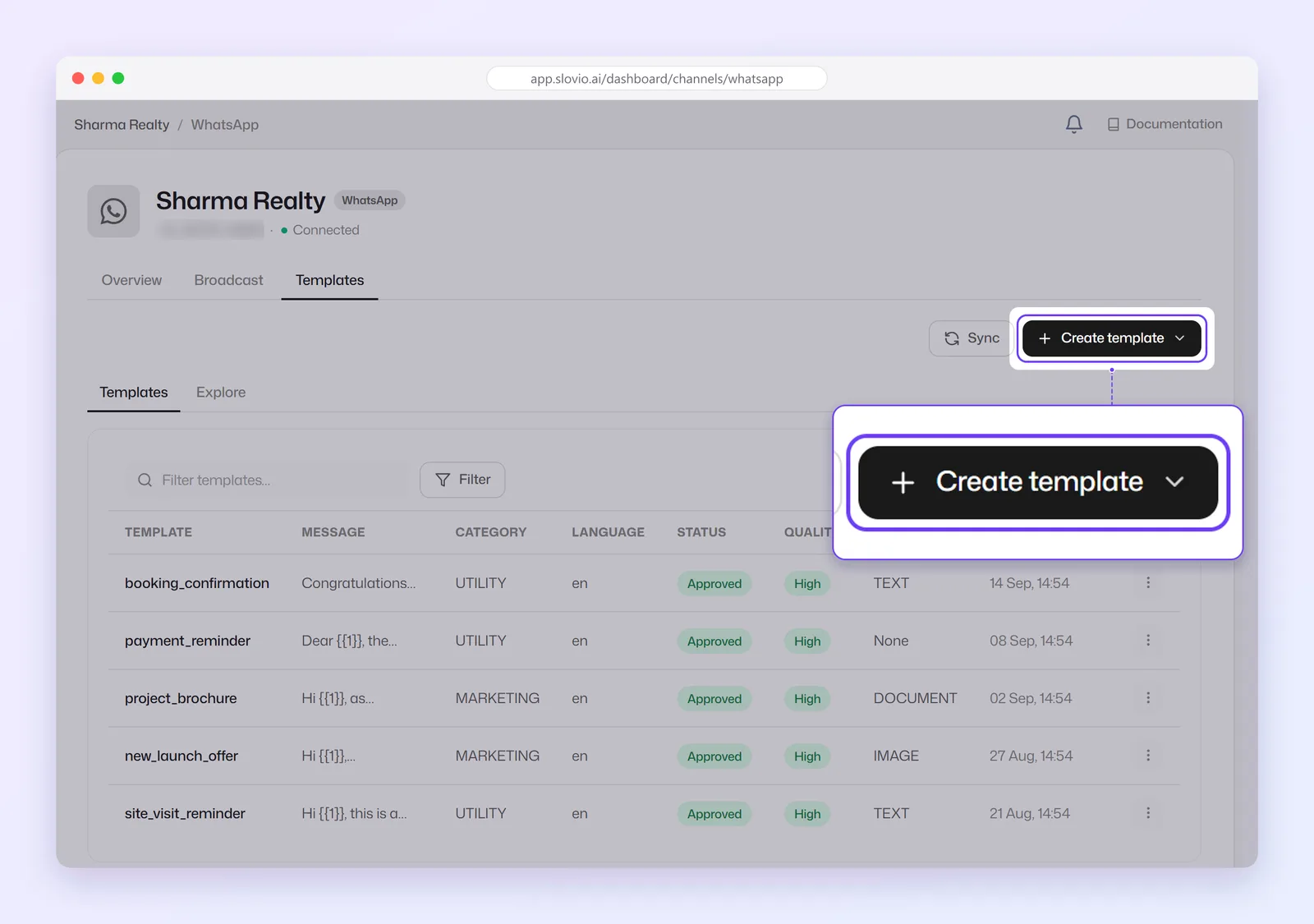
Fill in the form (below) and select Create Template.
The template goes to Meta for review and shows Pending until it is decided.
Select Sync to pull in templates you created directly in Meta.
The form, field by field
| Field | Rules |
|---|---|
| Template Name | Lowercase letters, numbers and underscores only. Capitals become lowercase and spaces become _. |
| Project | Which WhatsApp number the template belongs to. |
| Template Type | Marketing, Utility or Authentication. |
| Languages | The language of the text, for example English or Hindi. |
| Show header | Optional. Text, Image, Video, Document or Location. |
| Body | Up to 1024 characters, with variables like {{1}}. |
| Footer (Optional) | Up to 60 characters. |
| Template Buttons | Optional, up to 10 (below). |
Category
| Category | Use it for |
|---|---|
| Marketing | Offers, announcements, re-engagement. |
| Utility | Order updates, bookings, payment reminders tied to something the customer did. |
| Authentication | One-time passwords. |
The category decides the price. Meta can re-categorise a template if the content does not match. See How usage is charged.
An Authentication template has no header, body or footer to write. You set an Expiration Warning (Optional) in minutes and can tick Add Security Disclaimer; the template gets a Copy Code button.
Header
A Header Text is up to 60 characters and can contain one variable. Type some words first, then select Add Variable; a header cannot start with a variable. For Image, Video or Document, select the file to use as the sample.
Body and variables
Type the text and put each variable in double curly brackets, for example {{1}} or {{customer_name}}. When you create the template, variables are renumbered {{1}}, {{2}}, {{3}} in the order they first appear. For each variable, fill in a value under Sample Content for Body (Content for {{1}}, and so on).
The form refuses a body that:
- starts with a variable,
- ends with a variable,
- has two variables next to each other with no words between them.
You can format text with the bold, italic, strikethrough and monospace buttons, add emoji, and tick Transliteration to type Hindi and other Indian languages in English letters.
Buttons
Select Add Buttons and choose a type:
| Button | Limit | Settings |
|---|---|---|
| Quick Reply Buttons → Custom | Up to 8 | Button text only. |
| Visit website | Up to 2 | Static URL, or Dynamic with a Base URL and an Example value. |
| Call phone number | 1 | A phone number. |
| Add Flow | 1 | A WhatsApp Flow and its first screen. |
All buttons together: up to 10. Button Text is up to 25 characters. Drag buttons to change their order.
A Dynamic website button adds the per-customer part at the end of the URL. When you choose Dynamic, Use SmartLink tracking (cht.ad) is ticked; untick it to use your own Base URL, such as https://www.kaveriorganics.in/track/. The form shows what Meta will register, for example https://www.kaveriorganics.in/track/{{1}}. The Example is required and accepts letters, numbers, hyphens and underscores only.
Worked example: a Utility template
| Field | Value |
|---|---|
| Template Name | order_shipped |
| Template Type | Utility |
| Languages | English |
| Header Text | Your order is on its way |
| Body | Hi {{1}}, good news! Your order {{2}} from Kaveri Organics has been shipped. Track it with AWB number {{3}}. Expected delivery in 3-5 days. Thank you for shopping with us. |
| Sample Content | Asha / KO-10482 / DL5543210987 |
| Footer | Kaveri Organics Pvt Ltd, Pune |
| Buttons | Visit website, Dynamic: Track order, https://www.kaveriorganics.in/track/, Example DL5543210987; Call phone number: Call support, +919876543210 |
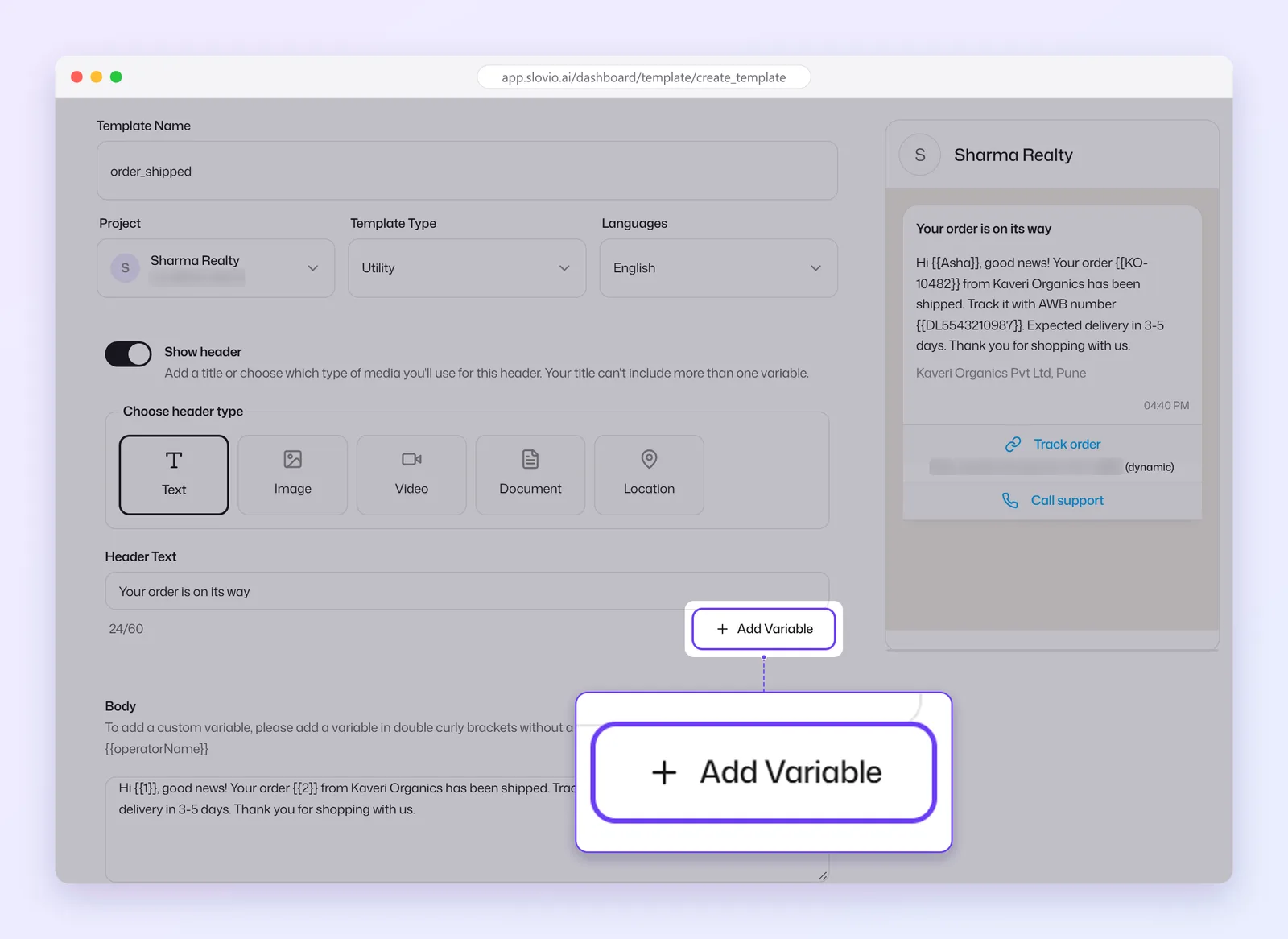
To send it to a customer list, follow the WhatsApp broadcast worked example.
Carousel templates
A carousel shows up to 10 cards the customer swipes through, under one main body.
- Create template → Carousel.
- Fill in Template Name, Project, Template Type, Languages and the main Body.
- Choose Number of Cards (1 to 10).
- For each card, use Change Card to switch, then set:
- Header: an Image or Video,
- Body: up to 160 characters,
- buttons: at least 1 and up to 2 per card (quick reply, Visit website, or one Call phone number).
When you broadcast a carousel, every variable on every card needs a value, or the page shows "Card N has some empty parameters."
Statuses
| Status | Meaning |
|---|---|
| Pending | Awaiting Meta review, usually within 24 hours. |
| Approved | Ready to send. |
| Rejected | Meta rejected it. Edit it (often the category or wording) and submit again. |
| Flagged | Quality is dropping. It will pause if the rating does not recover. |
| Paused | Paused by Meta for low quality. Sends are rejected until it resumes. |
| Disabled | Disabled by Meta after repeated pauses. Create a new template. |
The Quality column shows Meta's rating (High, Medium or Low) once enough messages have gone out. Low means the template is in danger of being paused or disabled.
Common questions
How long does template approval take?
Meta usually reviews a template within 24 hours. It shows Pending until then.
Can I edit an approved template?
You can edit and resubmit a template; it goes back to Meta for review before the new version is used.
Why was my template rejected?
The usual reasons are promotional wording in a Utility template, a body that starts or ends with a variable, or a template that is mostly variables. Fix the wording and submit again.
How many variables can a text header have?
One. Type some words first, then select Add Variable. A template whose text header has a variable can't be used in a broadcast yet: the broadcast template list marks it "can't be broadcast yet". For broadcasts, keep the header fixed text or use an image, video or document header, and put the personal details in the body.
Can I use a customer's name in a template?
Yes. Put a variable such as {{1}} in the body, then pick First Name for it when you send the broadcast.
Stuck, or is something here out of date? Tell the team — we reply within a working day.