Countries and sending rules
How to choose which countries your Slovio account can message, check per-country rates for WhatsApp, RCS and SMS, and understand opt-in and refused sends.
2 min readUpdated
You choose which countries your account can message in the account menu → Subscription & wallet → Pricing & countries. Each channel tab lists the price per message for every country, and a switch per country turns sending to it on or off.
Choose the countries you send to
Open the account menu (your avatar, bottom left) → Subscription & wallet.
Select the Pricing & countries tab.
Pick a channel tab: WhatsApp, RCS or SMS. Prices are per message, in rupees.
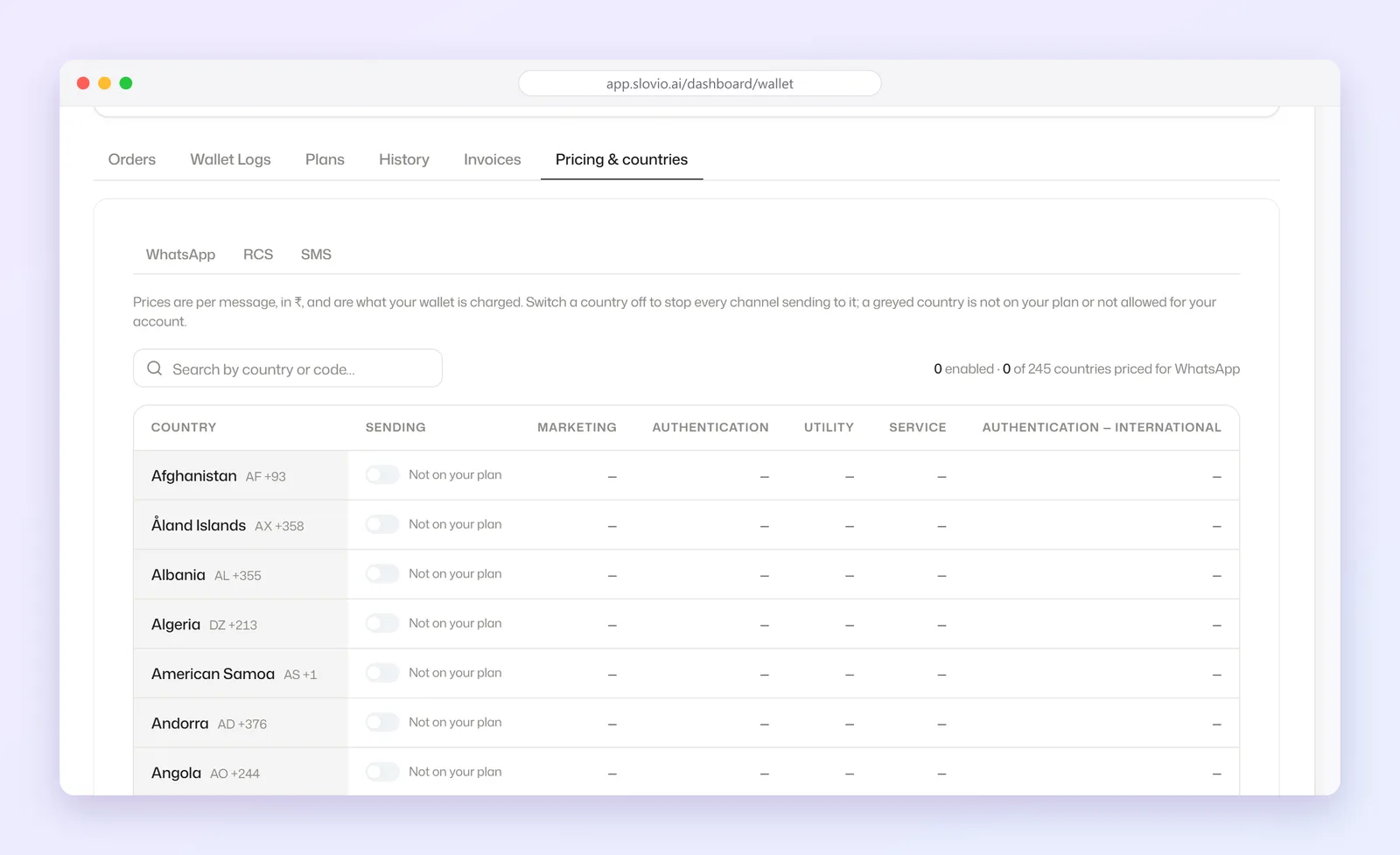
Switch a country off to stop every channel sending to it, or on to allow it.
Only the account owner can change this. A greyed-out country cannot be switched on, and shows why:
| Reason | Meaning | What to do |
|---|---|---|
| Not available on the platform | Slovio does not send to this country. | Nothing; it is not offered. |
| Not on your plan | The country has no price on your plan. | Upgrade, or ask your admin. |
| Not allowed by your admin | Your provider has blocked it. | Contact support or your admin. |
| Disabled on your account | You switched it off. | Switch it back on. |
Why a send may be refused
| Message | Meaning |
|---|---|
| Country … is not available for messaging | The number is in a country Slovio does not send to. |
| No pricing configured for country … in your plan | The country has no rate on your plan. |
| … is disabled in your plan / … is not enabled for this account | Switch the country on, or upgrade. |
| Insufficient balance | Recharge your wallet. |
| Sending is paused until this account's business verification is approved | Finish business verification. |
Get opt-in before you message
Message only people who agreed to hear from you. WhatsApp and TRAI require it, and it keeps your quality rating high.
- Each contact has an opt-in switch: Opted in to messages or Opted out.
- In a broadcast, choose Opt-in only to send only to opted-in contacts.
- Record where the consent came from (a form, a checkout box, a WhatsApp reply) in the contact's fields.
Worked example
Bansal Exports, Ludhiana, sells to buyers in India and the UAE. The owner opens Pricing & countries → WhatsApp, checks the per-message rates for India and the United Arab Emirates, and switches both on. Every other country is switched off.
Result: a broadcast to a list that includes a UK number (+44…) sends to the Indian and UAE numbers only. The UK message is refused with "… is not enabled for this account", and nothing is charged for it.
Common questions
Why is a country greyed out?
Either Slovio does not send there, it has no price on your plan, or your admin blocked it. The reason is shown next to the country.
Does switching a country off affect all channels?
Yes. It stops WhatsApp, RCS and SMS sending to that country.
Am I charged for a refused message?
No. A message refused for its country, balance or verification status is not sent and not charged.
Who can change the country list?
Only the account owner.
Stuck, or is something here out of date? Tell the team — we reply within a working day.