Outbound call campaigns
Run outbound AI call campaigns in Slovio: pick a voice agent and audience, set concurrency and calling hours, and read retries, auto-pause and results.
4 min readUpdated
An outbound call campaign dials a list of contacts with one of your voice agents. Create it in Calling → Campaigns → New campaign, choose the agent and the audience, and select Launch campaign. Slovio paces the calls, retries numbers that don't connect, skips your do-not-call list, and shows every outcome on the campaign's Results page.
Create a campaign
Open Calling → Campaigns → New campaign.
Enter a Campaign name, for example
October appointment reminders.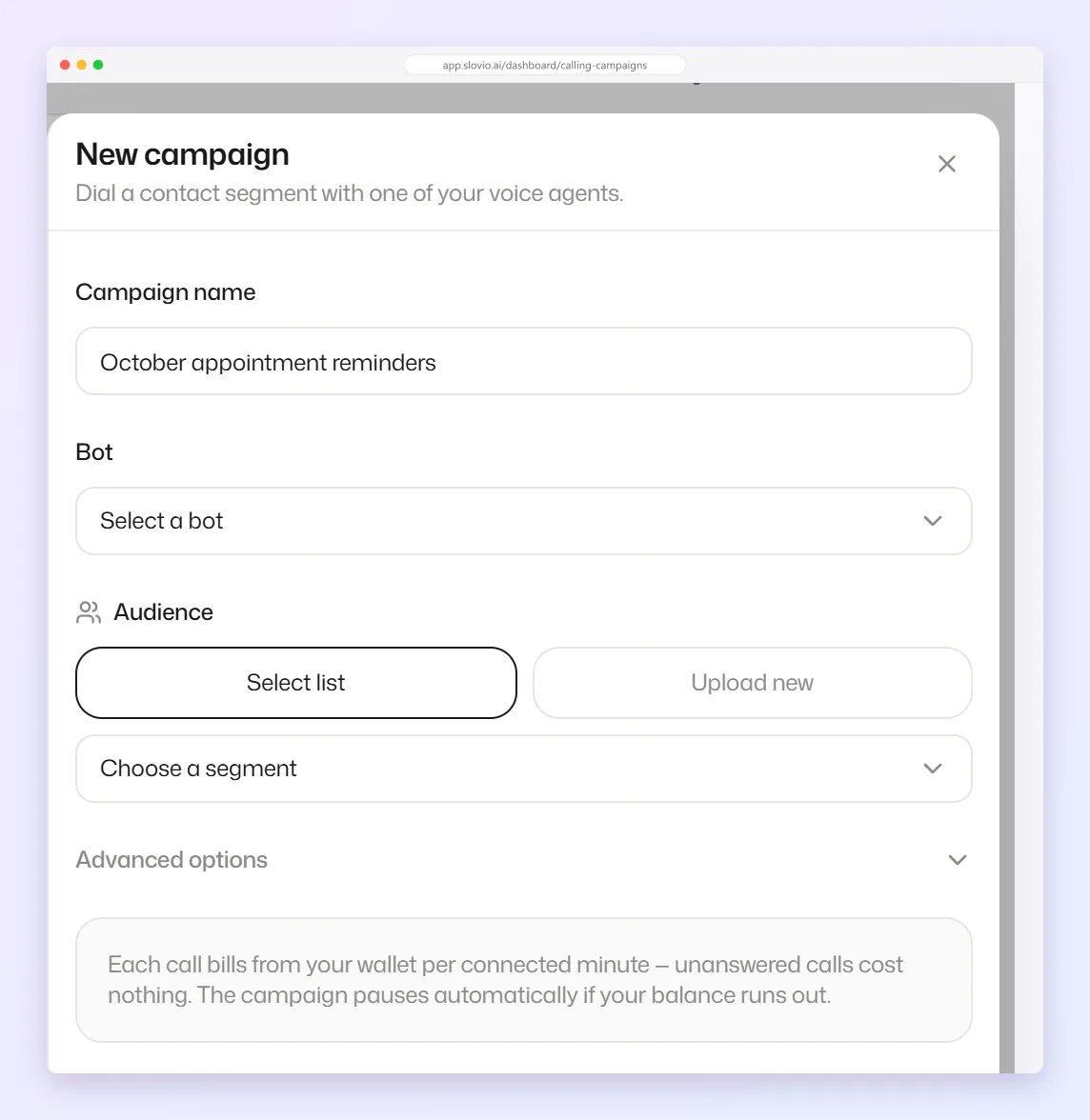
Choose the Bot: the voice agent that makes the calls.
Choose the Audience:
- Select list: pick a saved segment in Choose a segment.
- Upload new: upload a file of contacts. Wait for
Contacts uploaded — ready to launch.
Open Advanced options if you want to change the defaults:
- Concurrent calls: how many calls run at once, 1 to 20. Default 3.
- Calls / second: how fast new calls start, 0.2 to 10.
- Calling hours: switch on, pick the days, the From and To times and the Timezone. Outside these hours the campaign waits.
Select Launch campaign.
You see Campaign started. If some numbers were on your do-not-call list, the message also says how many were excluded.
A campaign can have up to 50,000 contacts. A bigger audience is refused with A campaign can have at most 50000 contacts — split it into smaller campaigns. Blocked contacts are left out.
Retries
Numbers that don't connect are retried automatically, up to 2 more times:
| Result | Retried after |
|---|---|
| Busy | 5 minutes |
| No answer | 15 minutes |
| Voicemail | 60 minutes |
Watch progress
Each campaign card shows done / total done, how many calls are in flight, and Done, Failed and Spent (₹). Use Pause and Resume at any time, and Results for the full report.
Why a campaign pauses by itself
A paused card shows the reason:
| Message | What happened | What to do |
|---|---|---|
| Paused by you. | You selected Pause. | Select Resume. |
| Paused automatically — the wallet or the rate card blocked every call. | Your wallet ran out, or calling is not priced for your account. | Recharge, then Resume. |
| Paused automatically — too many recent calls failed. | More than half of the last 5 minutes' calls failed (with at least 10 calls ended). | Check the list, the number and the agent, then Resume. |
The last one is a safety switch, so a bad list or a broken number doesn't waste your whole audience. Busy and unanswered calls don't count as failures. Nothing is lost while paused: remaining numbers wait in the queue.
Do-not-call list
Numbers on your do-not-call list are never dialled. They are dropped when you create a campaign, and refused at the moment of dialling too, including manual calls and API calls. Excluded numbers show as Do not call in the results.
Campaign results
Select Results on a campaign card. The page shows:
- Numbers, Connect rate, Spend and Avg talk time at the top.
- An outcome filter: All outcomes, Connected, Voicemail, Busy, No answer, Failed, Not called, Do not call or In progress.
- A table with Contact, Outcome, Attempts, Last attempt, Talk time, Cost, Recording (Yes or No), and one column for each value the agent extracted.
- The view button on a row opens the call's details, where you can play the recording.
If some costs show * and Spend (provisional), those calls are not settled yet. Their cost is the amount held, and may go down.
Export the results
Select Export CSV. The file follows the outcome filter you have chosen and has the columns Contact, Number, Outcome, Attempts, Last attempt (UTC), Talk time (s), Cost, Cost final, Recording, Last error, Call ID, then your extracted values.
Personalise each call
Each campaign call fills the agent's {{ }} tokens from that contact: {{firstName}}, {{lastName}}, and every custom field by its name, for example {{appointment_time}} or {{amount_due}}. A prompt like Hello {{firstName}} greets each contact by name. If a contact has no value for a token, that spot is spoken as a blank, so fill the field for everyone or phrase the sentence so it still works. To send values that aren't on the contact, place the calls with the Calls API and send variables.
Billing
Each call is charged from your wallet per connected minute; unanswered calls cost nothing. The campaign pauses automatically if your balance runs out. Recharge and resume.
Stay compliant
- Call only people who agreed to be contacted, within sensible hours in their timezone. Use Calling hours to enforce this.
- Respect requests not to be called again.
Common questions
How many calls run at the same time?
3 by default. Set Concurrent calls under Advanced options, from 1 to 20.
Will a number be called twice if it doesn't answer?
Yes, up to 2 more times: 15 minutes after no answer, 5 minutes after busy, 60 minutes after voicemail.
Why did my campaign pause on its own?
Either your wallet or rate card blocked every call, or more than half of the recent calls failed. The card says which. Fix the cause and select Resume.
Can I listen to a campaign call?
Yes. On the Results page, open the call's details from its row to play the recording.
What's the largest audience I can call?
50,000 contacts per campaign. Split a bigger list into several campaigns.
Stuck, or is something here out of date? Tell the team — we reply within a working day.