Broadcast fallback
Set up broadcast fallback in Slovio so people a WhatsApp broadcast could not reach get an RCS message instead, or the reverse, with its own template and wait.
3 min readUpdated
Broadcast fallback re-sends to the people your first broadcast could not reach, on a second channel. Switch on Fallback on the broadcast page, pick the other channel, a template and a wait time, and Slovio creates a linked fallback broadcast when the wait is over.
For example, a WhatsApp broadcast can fall back to RCS for people who do not use WhatsApp.
Before you start
- The fallback channel must be connected: an RCS channel to fall back from WhatsApp, or a WhatsApp number to fall back from RCS.
- It needs an approved template on that channel. See RCS templates or WhatsApp templates.
Set it up
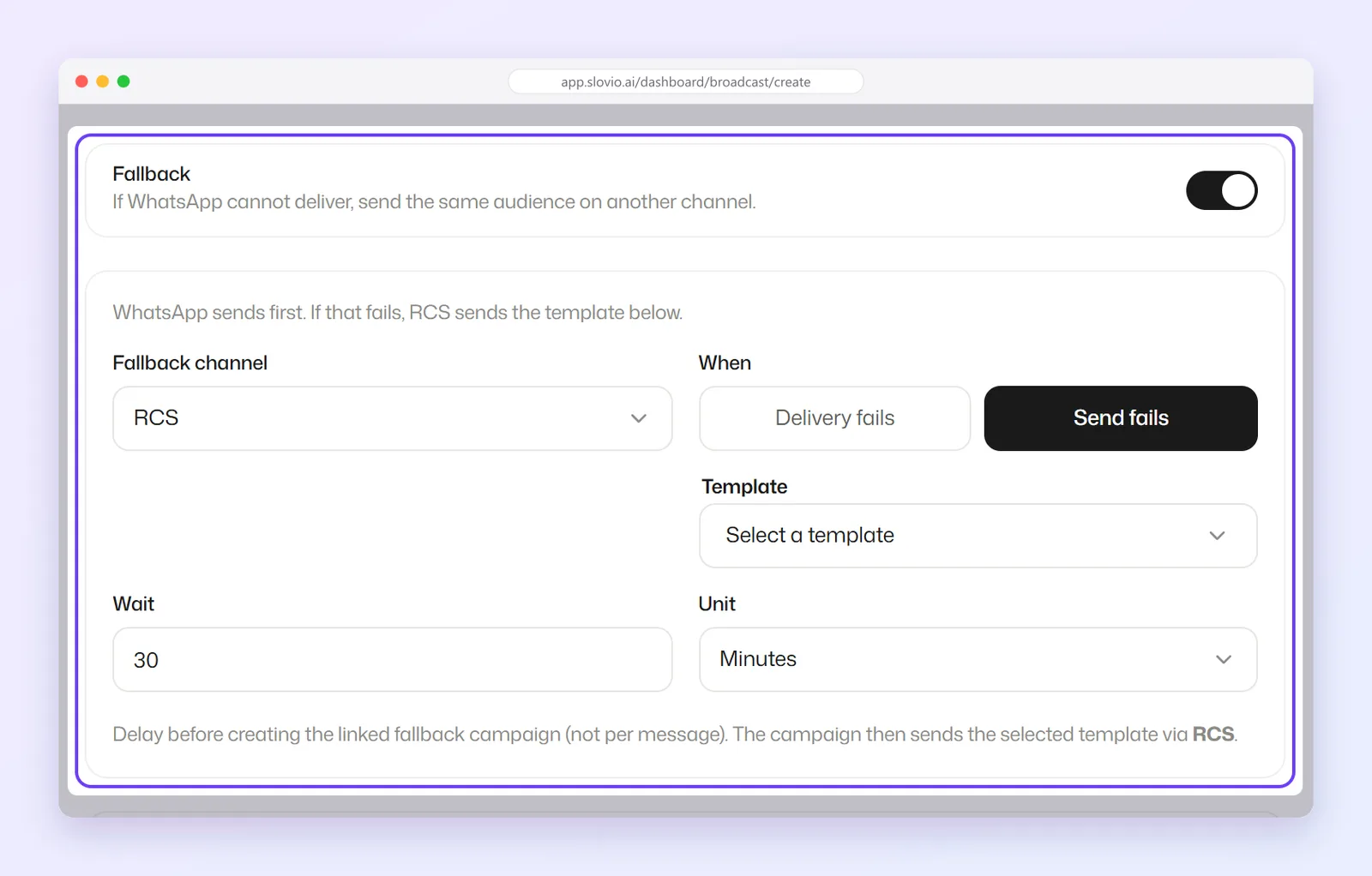
On the broadcast page, switch on Fallback ("If WhatsApp cannot deliver, send the same audience on another channel.").
Fill in the fallback section:
| Field | Options |
|---|---|
| Fallback channel | RCS for a WhatsApp broadcast; WhatsApp for an RCS broadcast. |
| When | Send fails (the default): the message could not be sent at all. Delivery fails: it was sent but never delivered. |
| RCS channel / WhatsApp channel | Which of your channels sends the fallback. |
| Template | An approved template on the fallback channel. |
| Template variables | A value for each variable in that template (below). |
| Wait and Unit | How long to wait before the fallback runs, in Minutes, Hours or Days. The default is 30 minutes; the longest is 30 days. |
Fill the fallback template's variables
Each variable box takes fixed text you type, or a field from its … menu. The fallback's … menu offers only the built-in fields: First Name, Last Name, Mobile and Email. Custom properties and Excel columns are not listed there.
For a WhatsApp fallback template, a picked field shows a badge you can select to set a Fallback value, the same as in the main template.
How it runs
When the wait is over, Slovio collects everyone the first broadcast failed to reach, by the rule you chose in When, and creates a new linked broadcast for them, named after the original with _Fallback added (for example Order shipped - 30 Sep_Fallback). It is priced at the fallback channel's own rates, holds its own amount from your wallet, and has its own report.
The wait is a delay before the fallback broadcast is created, not a delay per message. For Delivery fails, give delivery reports time to arrive; a few hours is usual.
Worked example
Kaveri Organics sends its order_shipped WhatsApp broadcast to 5,000 customers and wants anyone WhatsApp cannot reach to get an RCS message.
| Field | Value |
|---|---|
| Fallback channel | RCS |
| When | Send fails |
| RCS channel | Kaveri Organics |
| Template | order_shipped_rcs, a plain text template: Hi {{name}}, your Kaveri Organics order has shipped. Track it at kaveriorganics.in/track |
name |
… → First Name |
| Wait | 2 Hours |
If 180 of the 5,000 WhatsApp messages cannot be sent, then two hours after the broadcast finishes, Slovio creates a linked RCS broadcast for those 180 people, charged at your RCS rate. Asha, if she was one of them, receives on RCS:
Hi Asha, your Kaveri Organics order has shipped. Track it at kaveriorganics.in/trackCommon questions
Is the fallback charged separately?
Yes. The fallback is its own broadcast, priced at the fallback channel's rates, with its own hold on your wallet.
Can I use an Excel column in the fallback template?
Not from the … menu, which lists only First Name, Last Name, Mobile and Email. Use one of those or type fixed text.
Can SMS be the fallback channel?
Not yet. The fallback channel can be RCS (for WhatsApp broadcasts) or WhatsApp (for RCS broadcasts).
Where do I see the fallback's results?
It appears as its own broadcast, named with _Fallback at the end, in the fallback channel's Broadcast tab, with its own statistics.
What is the longest wait I can set?
30 days.
Stuck, or is something here out of date? Tell the team — we reply within a working day.