Create your account
How to sign up for Slovio, verify your email and mobile number with 6-digit codes, choose a password that meets the rules, and fix common sign-up problems.
3 min readUpdated
To create a Slovio account, go to app.slovio.ai/auth/register, enter your name, business and email, then your phone number and a password. Verify the 6-digit codes sent to your email and phone. It takes about three minutes.
Sign up
Go to app.slovio.ai/auth/register. The page is titled Create your account.
Enter your First name, Last name, Business name and Email. Business website (optional) and Referral code (optional) can be left empty.
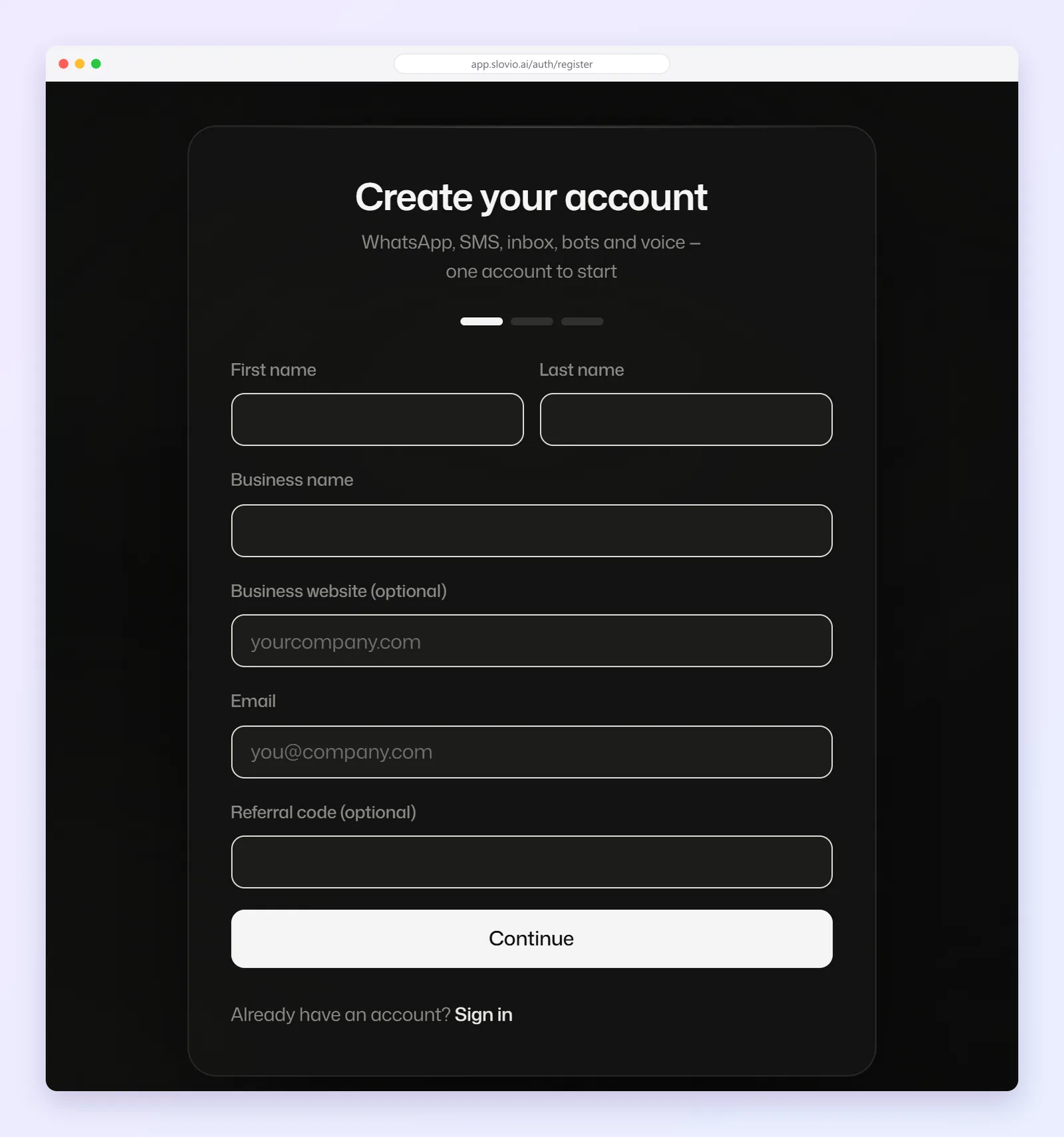
Select Continue.
Choose the country code (India +91 is the default) and enter your Phone number.
Enter a Password and Confirm password.
Tick I agree to the Terms of Service and Privacy Policy. and select Create account.
Password rules
At least 8 characters, with at least one letter and at least one number or symbol. The same rule applies when you reset or change it later.
Verify your email
Slovio emails you a 6-digit code. Enter it on Verify your email and select Verify email.
- The code is valid for 10 minutes.
- Didn't get it? Check spam, then select Didn't get the code? Resend.
- After three wrong codes, verification is locked for a while (30 minutes by default). Wait, then request a new code.
Verify your phone
Next, Slovio sends a 6-digit code to your mobile. Enter it on Verify your phone and select Verify phone.
What happens next
You land on Tell us about your business. See Set up your business profile.
Worked example
Pooja Rao runs Rao Catering Services in Mysuru.
- She enters First name "Pooja", Last name "Rao", Business name "Rao Catering Services", Email "pooja@raocatering.in", and leaves the website empty.
- She keeps +91, enters 9845012345, and sets the password "Biryani#2026".
- She ticks the terms box and selects Create account.
- She enters the email code, then the SMS code.
Result: she reaches Tell us about your business. A password like "biryani" would be refused: it has no number or symbol and is under 8 characters.
Fix sign-up problems
| Problem | What to do |
|---|---|
| "Too many registration attempts. Please try again after 15 minutes." | Sign-up allows 5 attempts per 15 minutes from one network. Wait 15 minutes. |
| "Too many OTP requests. Please try again after 1 minute." | You asked for codes too quickly. Wait a minute before selecting Resend. |
| An account already exists for this email | Sign in instead, or reset your password. |
| The phone code never arrives | Check the country code and number, then resend. If it still fails, contact support. |
Common questions
How long is the verification code valid?
10 minutes. Select Didn't get the code? Resend for a new one.
Which countries can I register a phone number from?
The country code list includes India (+91, the default), the US, UK, UAE, Australia, Singapore, South Africa and Nigeria.
I closed the page before verifying my phone. Do I start again?
No. Sign in with your email and password, and Slovio sends a fresh code for the missing step.
What makes a valid password?
At least 8 characters, with a letter and a number or symbol.
Stuck, or is something here out of date? Tell the team — we reply within a working day.