IVR, departments, team and business hours
Set up an IVR menu, departments, your team's browser softphone, ring time and failover, and business hours for your Slovio phone line and AI calling.
3 min readUpdated
Your phone line's routing is built from four pages under Calling → Telephony: IVR (the key-press menu), Departments (call queues), Team (how long each teammate rings and where missed calls go) and Business hours. Teammates take calls in the browser through the softphone on Live Calls.
IVR
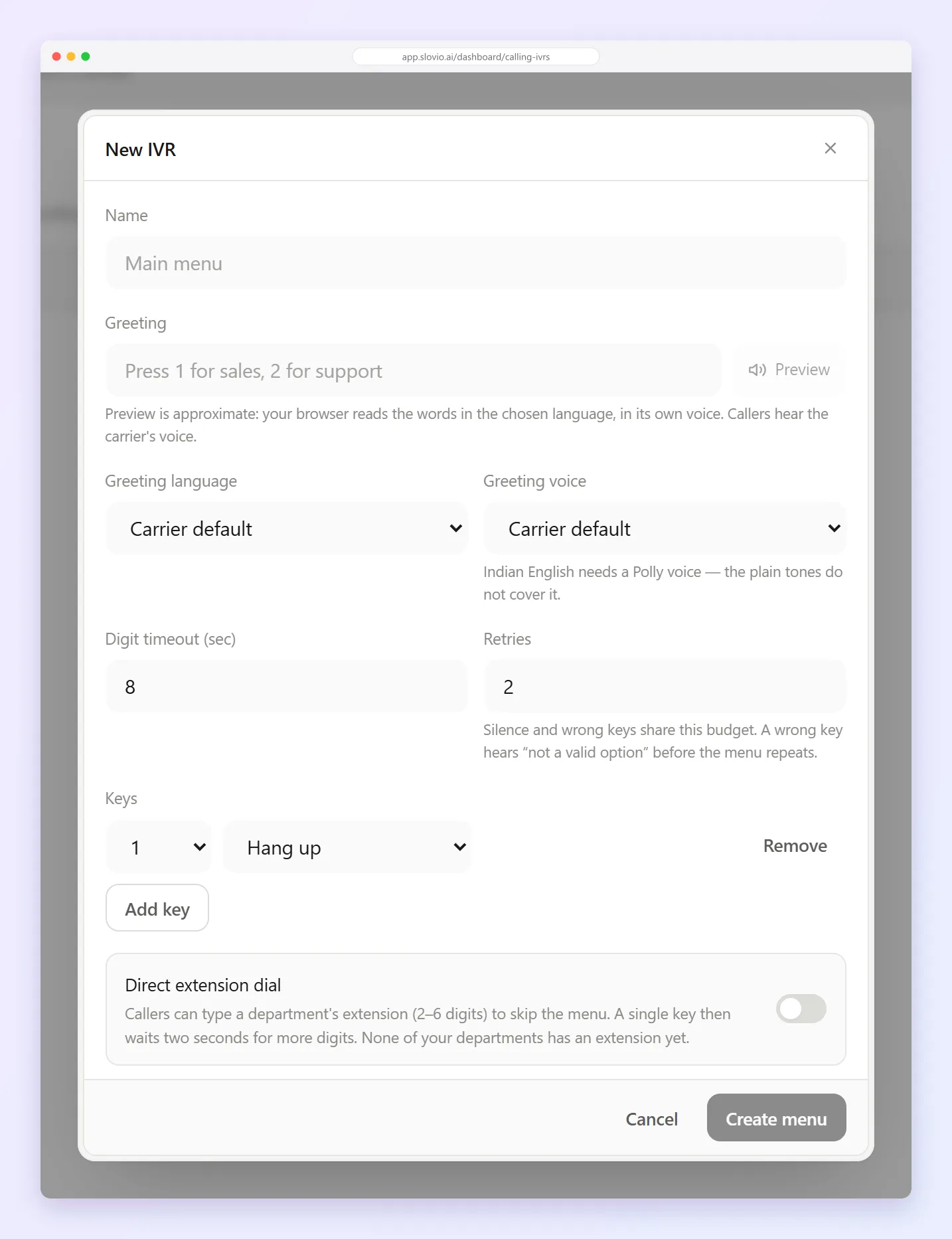
Calling → IVR:
- Greeting: the text read out, with its language and voice.
- Keys: what each key press does: go to a teammate, a department, another IVR or a voice agent; request a callback; leave voicemail; forward to a number; or hang up.
- Direct extension dial: let callers dial a 2 to 6 digit extension.
- What happens when the caller presses nothing, or presses a wrong key too often.
Departments
Departments are call queues:
- Ring strategy: Ring everyone at once, or One at a time.
- An extension and hold music.
- Overflow when nobody answers: hang up, go to an IVR, another department, a phone number or voicemail.
Set up the browser softphone
Teammates answer and make calls in the browser. There is nothing to install.
- Open Calling → Live Calls.
- Set yourself Available in the header.
- While Available, inbound calls for you ring in this browser tab. Select it again to go Offline.
- To call out, select Dial, enter the number in full international form (for example
+919876543210) and select Call. You seeConnecting — answer here when it rings.
During a call you can Mute, open the Keypad, Hold, Transfer (to a queue, an IVR, a teammate or a number) and End the call.
If you see This browser is not taking calls, calls you place still reach the other person, but nothing will ring in this browser until the connection is fixed.
Team: ring time and failover
Calling → Team lists each teammate with their Softphone status (Ready or Not set up), how long they Ring for (default 30 seconds) and what happens If unanswered. These settings apply when a number, an IVR key or an overflow rings a teammate directly. Department rings follow the department's own settings.
To change a teammate's settings:
- Select edit on the teammate. It is available once they have opened the dialer and set up their softphone.
- In the Call settings window, set how long to ring them (Ring … for (seconds)): 1 to 600.
- Choose a Failover destination: No failover, Ring another teammate, Ring a phone number, Send to a department, Send to an IVR menu or Send to voicemail.
- Pick the teammate, department, IVR menu or mailbox, or enter the Phone number with its country code.
- Under Fail over when the call is, tick No answer, Busy and/or Unreachable. Unreachable covers a softphone that is offline or not signed in.
- Select Save.
Example
Neha in sales rings for 25 seconds. If she doesn't answer or is offline, the call goes to Ring a phone number +919876543210, the sales manager's mobile. Tick No answer and Unreachable, leave Busy unticked so a caller who reaches her while she is on another call waits for her instead.
Business hours
Business hours sets your open hours and holidays, and where calls go when you're closed.
Common questions
Do my teammates need a desk phone?
No. They take calls in the browser from Live Calls after setting themselves Available.
Why can't I edit a teammate on the Team page?
Their softphone isn't set up yet. Ask them to open Live Calls and the dialer once in their browser.
What happens if a teammate is offline?
The call counts as unreachable. If Unreachable is ticked in their failover, it goes to the failover destination.
Does the failover apply to department calls?
No. Calls that come through a department follow that department's ring strategy and Overflow.
Can callers reach an AI agent from the IVR?
Yes. An IVR key can send the caller to a voice agent. IVR routing goes live with the PBX release.
Stuck, or is something here out of date? Tell the team — we reply within a working day.